I’ve been diving into the world of MLOps lately, curious about how modern ML pipelines can be made more scalable and maintainable. Machine learning is so much more than just training a model, there’s data pre-processing, feature engineering, evaluation, deployment, and the ongoing need for everything to be reproducible.
As a DevOps engineer, I’ve spent years designing reliable workflows for CI/CD and infrastructure automation, but hadn’t explored how those same principles could apply to ML pipelines. That’s where Argo Workflows and Argo Events caught my attention. They’re lightweight, Kubernetes-native, and from what I’ve seen so far, they’re gaining real traction in the MLOps space.
This post is my first hands-on look at these tools, setting up Argo Workflows and Argo Events on a local cluster with kind and exploring how they might enable event-driven, reproducible ML pipelines.
🧠Why Argo Workflows for MLOps?
Traditional ML pipelines are often stitched together using ad-hoc scripts, cron jobs, or heavy frameworks like Kubeflow. Argo Workflows offers a Kubernetes-native, lightweight alternative for orchestrating ML pipelines with:
- Containerised tasks: Each step runs in its own container for reproducibility.
- DAG-based workflows: Easily express complex pipelines with dependencies.
- Event-driven triggers: With Argo Events, workflows can be launched automatically when new data arrives or other events occur.
- Parallel execution: Fan-out tasks for hyperparameter tuning, multi-model training, or batch inference.
- Retry strategies & exit handlers: Add robustness with built-in error handling and graceful exits.
- Artifact management: Integrate with MinIO or volume mounts to persist model files, metrics, or datasets across steps.
Compared to tools like Kubeflow, Argo is simpler and less opinionated, making it easier to integrate with tools like MLflow, Seldon Core, etc. Its flexibility lets you tailor pipelines to your needs without locking into rigid frameworks.
🛠️Initial Setup
Here’s the setup I used for experimenting locally:
Create a kind Cluster
kind create cluster --name mlops-local
Install Argo Workflows
Run these commands to add it to the cluster:
kubectl create namespace argo
kubectl apply -n argo -f https://github.com/argoproj/argo-workflows/releases/latest/download/install.yaml
Install Argo Events
Run these commands to add it to the kind cluster:
kubectl create namespace argo-events
kubectl apply -f https://raw.githubusercontent.com/argoproj/argo-events/stable/manifests/install.yaml
With everything installed, let’s walk through building an event-driven pipeline step-by-step.
Setting Up Event-Driven Pipelines
The fun part of MLOps with Argo is how events can trigger workflows. Here’s a minimal example I tried using webhooks.
Define an EventBus
Once defined, load it into the kind cluster:
🔽📄eventbus.yaml
apiVersion: argoproj.io/v1alpha1
kind: EventBus
metadata:
  name: default
spec:
  nats:
    native:
      # minimum3.
      replicas: 3
      auth: token
kubectl apply -n argo-events -f eventbus.yaml
Roles and Service Account
You’ll need a role, rolebinding, and service account to allow Argo Events to trigger workflows.
🔽📄role.yaml
apiVersion: rbac.authorization.k8s.io/v1
kind: Role
metadata:
  name: argo-workflow-role
  namespace: argo-events
rules:
  - apiGroups: [""]
    resources: ["pods"]
    verbs: ["patch", "create", "get", "list", "watch", "delete"]
  - apiGroups: [""]
    resources: ["pods/log"]
    verbs: ["get", "list", "watch"]
  - apiGroups: ["argoproj.io"]
    resources: ["workflows"]
    verbs: ["create", "get", "list", "watch", "update", "patch", "delete"]
  - apiGroups: ["argoproj.io"]
    resources: ["workflows/finalizers"]
    verbs: ["update"]
  - apiGroups: ["argoproj.io"]
    resources: ["workflowtaskresults"]
    verbs: ["create","patch"]
  - apiGroups: [""]
    resources: ["configmaps"]
    verbs: ["get"]
  - apiGroups: [""]
    resources: ["serviceaccounts"]
    verbs: ["get"]
🔽📄rolebinding.yaml
apiVersion: rbac.authorization.k8s.io/v1
kind: RoleBinding
metadata:
  name: argo-workflowtaskresults-binding
  namespace: argo-events
roleRef:
  apiGroup: rbac.authorization.k8s.io
  kind: Role
  name:  argo-workflow-role
subjects:
  - kind: ServiceAccount
    name: operate-workflow-sa
    namespace: argo-events
🔽📄serviceaccount.yaml
apiVersion: v1
kind: ServiceAccount
metadata:
  name: operate-workflow-sa
  namespace: argo-events
With everything configured, load it into the kind cluster:
kubectl apply -n argo-events -f role.yaml
kubectl apply -n argo-events -f rolebinding.yaml
kubectl apply -n argo-events -f serviceaccount.yaml
Define a Webhook EventSource
This sets up a simple HTTP endpoint that triggers a workflow when called.
🔽📄event-source.yaml
apiVersion: argoproj.io/v1alpha1
kind: EventSource
metadata:
  name: webhook
  namespace: argo-events
spec:
  service:
    ports:
      - port: 12000
        targetPort: 12000
  webhook:
    trigger:
      port: "12000"
      endpoint: /trigger
      method: POST
Once defined, load it into your cluster:
kubectl apply -n argo-events -f event-source.yaml
Define a Sensor to Trigger Workflows
🔽📄sensor.yaml
apiVersion: argoproj.io/v1alpha1
kind: Sensor
metadata:
  name: ml-pipeline-sensor
  namespace: argo-events
spec:
  template:
    serviceAccountName: operate-workflow-sa
  dependencies:
    - name: training-event
      eventSourceName: webhook
      eventName: trigger
  triggers:
    - template:
        name: trigger-ml-pipeline
        k8s:
          operation: create
          source:
            resource:
              apiVersion: argoproj.io/v1alpha1
              kind: Workflow
              metadata:
                generateName: ml-pipeline-run-
              spec:
                workflowTemplateRef:
                  name: ml-pipeline-template
                arguments:
                  parameters:
                    - name: model
                      value: default-model
                    - name: dataset
                      value: default-dataset
          parameters:
            - src:
                dependencyName: training-event
                dataKey: body.model
              dest: spec.arguments.parameters.0.value
            - src:
                dependencyName: training-event
                dataKey: body.dataset
              dest: spec.arguments.parameters.1.value
Once defined, load it into your cluster:
kubectl apply -n argo-events -f sensor.yaml
Define a Workflow Template
This is a mock ML pipeline with train and evaluate steps with an example of using parameters
🔽📄workflowtemplate.yaml
apiVersion: argoproj.io/v1alpha1
kind: WorkflowTemplate
metadata:
  name: ml-pipeline-template
  namespace: argo-events
spec:
  entrypoint: pipeline
  serviceAccountName: operate-workflow-sa
  templates:
    - name: pipeline
      dag:
        tasks:
          - name: train-model
            template: train
            arguments:
              parameters:
                - name: model
                  value: "{{workflow.parameters.model}}"
          - name: evaluate-model
            dependencies: [train-model]
            template: evaluate
            arguments:
              parameters:
                - name: dataset
                  value: "{{workflow.parameters.dataset}}"

    - name: train
      inputs:
        parameters:
          - name: model
      container:
        image: python:3.9
        command: ["python"]
        args: ["-c", "print('Training {{inputs.parameters.model}}...')"]

    - name: evaluate
      inputs:
        parameters:
          - name: dataset
      container:
        image: python:3.9
        command: ["python"]
        args: ["-c", "print('Evaluating {{inputs.parameters.dataset}}...')"]
Once defined, load it into your cluster:
kubectl apply -n argo-events -f workflowtemplate.yaml
📬Trigger Event
First expose the webhook so it can be actioned:
kubectl -n argo-events port-forward svc/webhook-eventsource-svc 12000:12000
Trigger it by sending a POST request via curl:
curl -d '{"model":"resnet","dataset":"imagenet"}' \
  -H "Content-Type: application/json" -X POST http://localhost:12000/trigger
👀Visualizing the Pipeline
Patch the argo-server for local access:
kubectl patch deployment argo-server --namespace argo --type='json' \
  -p='[{"op": "replace", "path": "/spec/template/spec/containers/0/args", "value": ["server","--auth-mode=server"]}]'
Then:
kubectl port-forward svc/argo-server -n argo 2746:2746
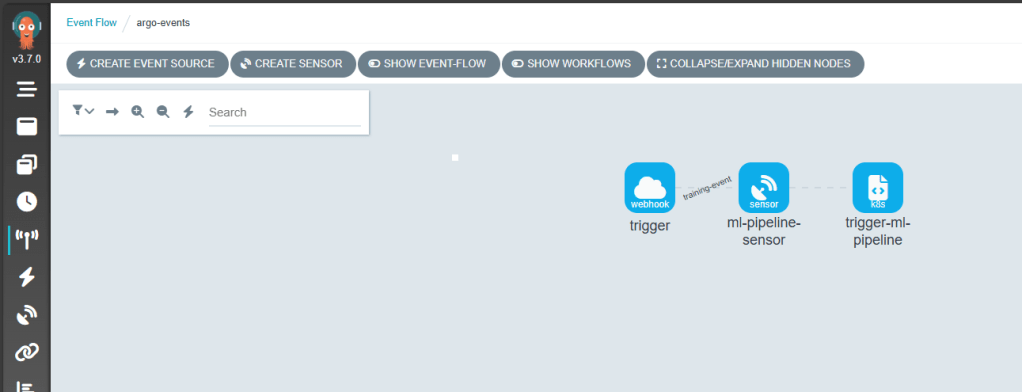
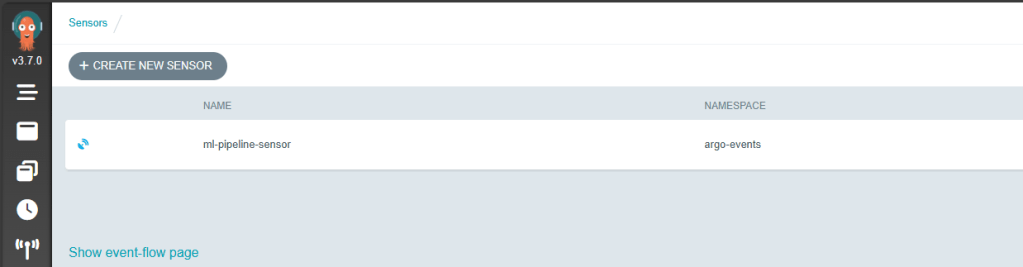
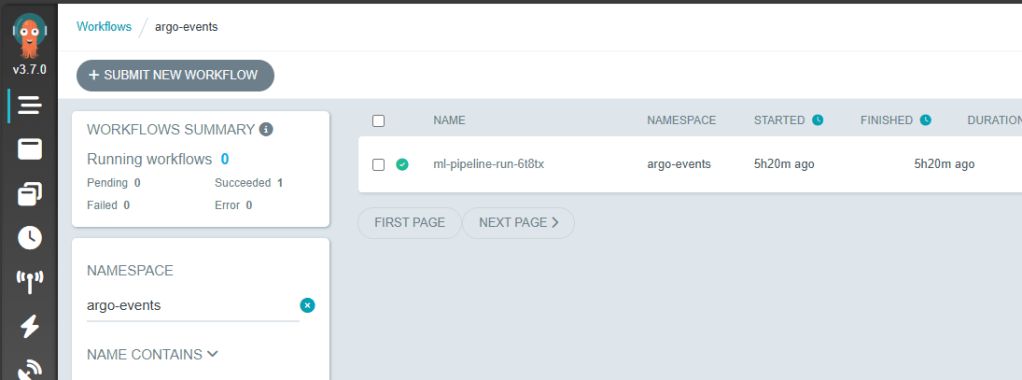
Navigate to https://localhost:2746 to visualise your pipeline. You should see the following configuration
Event Flow
Event Sources

Sensor
Workflow Templates

Workflow Runs
🌐Real-World MLOps Use Cases
This is where I see Argo Workflows + Events fitting into real ML pipelines:
- Event-Driven Model Training
- Continuous Model Evaluation (CME)
- ETL for ML Pipelines
- Model Deployment Automation
📚Further Reading & Resources
- Argo Workflows ML Use Cases
- Pipekit: ETL Examples with Argo
- Leveraging Argo Workflows for MLOps
- Video: Beyond Prototypes: Production-Ready ML Systems with Metaflow and Argo
- Video: Dynamic, Event-Driven Machine Learning Pipelines with Argo Workflows
🚀 What’s Next
Argo Workflows and Argo Events have opened the door to scalable, event-driven ML pipelines, but there’s much more to explore:
📦 GitOps Delivery with ArgoCD
Pairing ArgoCD with Argo Workflows would enable declarative, version-controlled deployment of ML pipelines across environments. Imagine triggering new workflow templates from a Git commit and syncing changes automatically.
📡 Real-World Event Sources
How about connecting Argo Events to cloud-native services such as:
- AWS SQS / SNS
- Azure Service Bus
- etc.
These integrations could allow upstream events to dynamically trigger ML pipelines.
🔧 Tool Integrations Ahead
What about adding further integration with popular tools:
- MLflow – for experiment tracking and lifecycle management
- KServe – to enable model serving within a Kubernetes-native stack
- etc.
I hope this post sparked some ideas, go give Argo a spin and explore your own event-driven ML workflows!
 Coding With Taz