I’ve been diving into the world of MLOps lately, curious about how modern ML pipelines can be made more scalable and maintainable. Machine learning is so much more than just training a model, there’s data pre-processing, feature engineering, evaluation, deployment, and the ongoing need for everything to be reproducible.
As a DevOps engineer, I’ve spent years designing reliable workflows for CI/CD and infrastructure automation, but hadn’t explored how those same principles could apply to ML pipelines. That’s where Argo Workflows and Argo Events caught my attention. They’re lightweight, Kubernetes-native, and from what I’ve seen so far, they’re gaining real traction in the MLOps space.
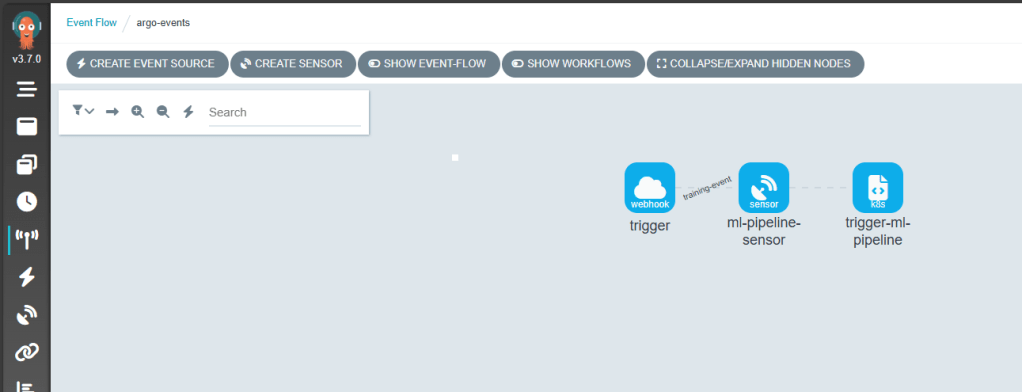
This post is my first hands-on look at these tools, setting up Argo Workflows and Argo Events on a local cluster with kind and exploring how they might enable event-driven, reproducible ML pipelines.
🧠Why Argo Workflows for MLOps?
Traditional ML pipelines are often stitched together using ad-hoc scripts, cron jobs, or heavy frameworks like Kubeflow. Argo Workflows offers a Kubernetes-native, lightweight alternative for orchestrating ML pipelines with:
Containerised tasks: Each step runs in its own container for reproducibility.
DAG-based workflows: Easily express complex pipelines with dependencies.
Event-driven triggers: With Argo Events, workflows can be launched automatically when new data arrives or other events occur.
Parallel execution: Fan-out tasks for hyperparameter tuning, multi-model training, or batch inference.
Retry strategies & exit handlers: Add robustness with built-in error handling and graceful exits.
Artifact management: Integrate with MinIO or volume mounts to persist model files, metrics, or datasets across steps.
Compared to tools like Kubeflow, Argo is simpler and less opinionated, making it easier to integrate with tools like MLflow, Seldon Core, etc. Its flexibility lets you tailor pipelines to your needs without locking into rigid frameworks.
🛠️Initial Setup
Here’s the setup I used for experimenting locally:
Argo Workflows and Argo Events have opened the door to scalable, event-driven ML pipelines, but there’s much more to explore:
📦 GitOps Delivery with ArgoCD
Pairing ArgoCD with Argo Workflows would enable declarative, version-controlled deployment of ML pipelines across environments. Imagine triggering new workflow templates from a Git commit and syncing changes automatically.
📡 Real-World Event Sources
How about connecting Argo Events to cloud-native services such as:
AWS SQS / SNS
Azure Service Bus
etc.
These integrations could allow upstream events to dynamically trigger ML pipelines.
🔧 Tool Integrations Ahead
What about adding further integration with popular tools:
MLflow – for experiment tracking and lifecycle management
KServe – to enable model serving within a Kubernetes-native stack
etc.
I hope this post sparked some ideas, go give Argo a spin and explore your own event-driven ML workflows!
Feature flags have revolutionised how teams deploy and test features, allowing controlled rollouts, A/B testing, and quick toggling of functionality. But teams adopting feature flagging often face vendor lock-in, making it difficult to switch providers or maintain a consistent implementation across their codebase.
I was recently catching up on some talks from Kubecon 2025 on the CNCF YouTube channel and there were some talks around Feature Flags and OpenFeature. Curious about its potential, I decided to take a deeper dive into OpenFeature to understand its advantages.
OpenFeature is a CNCF project that provides a standardised SDK, allowing you to integrate with custom logic or external vendors. OpenFeature abstracts away the complexities of working with different providers, ensuring flexibility, portability, and consistency in how applications manage flags.
The architecture looks like this (taken from their website)
OpenFeature supports multiple feature flag providers, ensuring flexibility across different ecosystems. Some of the current providers include:
Flagd – An open-source remote flag evaluation service.
LaunchDarkly – A popular enterprise feature flag management platform.
Flipt – A lightweight, self-hosted feature flag solution.
GrowthBook – A powerful open-source A/B testing and feature flagging tool.
These are just a few examples, with many more integrations available.
OpenFeature supports creating custom Providers that allow developers to build their own providers for their feature flag management or even connect to providers not currently supported by OpenFeature.
Since OpenFeature provides a consistent API, teams can easily switch providers without modifying their application logic, making feature flag management truly flexible.
These days I use a mix Azure and AWS and wondered how OpenFeature would work with Azure App Configuration and AWS AppConfig, so in this post, we’ll explore:
How OpenFeature eliminates vendor lock-in for feature flags.
Implementing feature flags with OpenFeature and utilising cloud services Azure App Configuration and AWS AppConfig.
How you can use OpenFeature in .NET and Python applications with a couple of basic examples
This post assumes you already have an instance of Azure App Configuration and/or AWS App Config set up. If not, refer to their respective documentation for provisioning.
Let’s dive in and see what it’s all about! 🚀
Getting Started with OpenFeature
Adding OpenFeature to code is fairly simple, the documentation is well structured with clear examples for multiple languages. While OpenFeature supports multiple languages including Go, Java, and Rust—this post will focus on its implementation in .NET and Python
Here’s a basic implementation using OpenFeature in a console application, demonstrating how to register a provider and retrieve flag values
dotnet add package OpenFeature
Following the documentation the basic code in a console app would look something like this in .NET:
using OpenFeature;
using OpenFeature.Model;

 // Register your feature flag provider
 await Api.Instance.SetProviderAsync(new InMemoryProvider());

// Create a new client
FeatureClient client = Api.Instance.GetClient();

// Retrieve and evaluate the flag
var feature1Enabled = await client.GetBooleanValueAsync("feature1", false);
Console.WriteLine(feature1Enabled ? "Flag is Enabled!" : "Flag is Disabled!");
and in Python:
pip install openfeature-sdk
from openfeature import api
from openfeature.provider.in_memory_provider import InMemoryFlag, InMemoryProvider

feature_flags = {
  "feature1": InMemoryFlag("on", {"on": True, "off": False})
}

# Register your feature flag provider
api.set_provider(InMemoryProvider(feature_flags))

# Create a client
client = api.get_client()

# Retrieve and evaluate the flag
feature1_enabled = client.get_boolean_value("feature1", False)
print("Flag is Enabled!" if feature1_enabled else "Flag is Disabled!")
Exploring OpenFeature with Azure App Configuration
With the setup in place, let’s explore how OpenFeature integrates seamlessly with Azure App Configuration to manage feature flags.
The below image shows some sample feature flags defined in Azure App Configuration ready to use for this demo
Azure App Configuration provides centralised configuration management, versioning, and built-in feature flag support, making it a powerful choice for dynamic application settings. To evaluate feature flags within Azure App Configuration, Microsoft recommends using the Feature Management Library, which provides a robust and flexible way to manage flag states.
Let’s add the packages for Azure App Configuration
After some looking around at the OpenFeature sdk Contrib in GitHub, I found there was already a provider for the FeatureManagement and found a preview version on Nuget, so let’s add that.
It is good practice to use Azure Identity for connecting to Azure App Configuration but for this demo we are just going to use the ConnectionString. You can get the connection string from the Azure Portal.
Let’s add the additional code to use the Feature Manager Provider
using Microsoft.Extensions.Configuration;
using Microsoft.Extensions.Configuration.AzureAppConfiguration;
using OpenFeature;
using OpenFeature.Contrib.Providers.FeatureManagement;

IConfigurationRefresher refresher = null;
var builder = new ConfigurationBuilder();
builder.AddAzureAppConfiguration(async options =>
{
    var endpoint = "Endpoint=https://flagsdemo-dev.azconfig.io;Id=xxxxxx;Secret=xxxxxxxxxxxxxxxxxxxx";
    options.Connect(endpoint)
        .ConfigureRefresh(refresh =>
        {
            refresh.Register($".appconfig.featureflag/feature1")
                .SetRefreshInterval(TimeSpan.FromSeconds(30));
        });
    refresher = options.GetRefresher();
});
var config = builder.Build();

// Register your feature flag provider
await Api.Instance.SetProviderAsync(new FeatureManagementProvider(config));

// Create a new client
FeatureClient client = Api.Instance.GetClient();

// Get the flag value
var feature1Enabled = await client.GetBooleanValueAsync("feature1", false);
Console.WriteLine(feature1Enabled ? "Flag is Enabled!" : "Flag is Disabled!");
Running the code gives the same value as previously “Flag is Disabled!”, so let’s enable the flag via the Azure Portal
Using the contrib provider, we encountered an issue where basic feature flags were not being evaluated correctly, consistently returning ‘Flag is Disabled!’ regardless of configuration. After submitting a PR to address this issue, we’ll have to use a workaround and create a new provider, which, in a way, is a great opportunity to showcase just how simple it is to implement a custom provider for feature flag management.
Following the instructions from the OpenFeature documentation we created a provider, implementing the bare minimum and adding the FeatureManagement Library
dotnet add package Microsoft.FeatureManagement
using Microsoft.Extensions.Configuration;
using Microsoft.FeatureManagement;
using OpenFeature;
using OpenFeature.Model;

public class FeatureManagementProvider : FeatureProvider
{
    private readonly FeatureManager _featureManager;

    public FeatureManagementProvider(IConfiguration configuration)
    {
        _featureManager = new FeatureManager(new ConfigurationFeatureDefinitionProvider(configuration), new FeatureManagementOptions());

    }
    public override Metadata GetMetadata()
    {
        return new Metadata("Feature Management Provider");
    }

    public override async Task<ResolutionDetails<bool>> ResolveBooleanValueAsync(string flagKey, bool defaultValue, EvaluationContext? context = null, CancellationToken cancellationToken = default)
    {
        var enabled = await _featureManager.IsEnabledAsync(flagKey, context, cancellationToken);
        return new ResolutionDetails<bool>(flagKey, enabled);
    }

    public override Task<ResolutionDetails<string>> ResolveStringValueAsync(string flagKey, string defaultValue, EvaluationContext? context = null, CancellationToken cancellationToken = default)
    {
        throw new NotImplementedException();
    }

    public override Task<ResolutionDetails<int>> ResolveIntegerValueAsync(string flagKey, int defaultValue, EvaluationContext? context = null,
        CancellationToken cancellationToken = new CancellationToken())
    {
        throw new NotImplementedException();
    }

    public override Task<ResolutionDetails<double>> ResolveDoubleValueAsync(string flagKey, double defaultValue, EvaluationContext? context = null, CancellationToken cancellationToken = default)
    {
        throw new NotImplementedException();
    }

    public override Task<ResolutionDetails<Value>> ResolveStructureValueAsync(string flagKey, Value defaultValue, EvaluationContext? context = null, CancellationToken cancellationToken = default)
    {
        throw new NotImplementedException();
    }
}
Using this new provider the code now returns correctly “Flag is Enabled!” as expected, the code is far from production ready but certainly shows how simple adding a new Provider is.
To make feature flag updates more visible in real time, let’s introduce a refresh interval and a polling mechanism. The refresh interval will be set to 30 seconds, while a loop running every 10 seconds will control when the app sends requests to the Azure App Configuration Service.
using Microsoft.Extensions.Configuration;
using Microsoft.Extensions.Configuration.AzureAppConfiguration;
using OpenFeature;

IConfigurationRefresher refresher = null;
var builder = new ConfigurationBuilder();
builder.AddAzureAppConfiguration(async options =>
{
    var endpoint = "Endpoint=https://flagsdemo-dev.azconfig.io;Id=xxxxxx;Secret=xxxxxxxxxxxxxxxxxxxx";
    options.Connect(endpoint)
        .ConfigureRefresh(refresh =>
        {
            refresh.Register($".appconfig.featureflag/feature1")
                .SetRefreshInterval(TimeSpan.FromSeconds(30));
        });
    refresher = options.GetRefresher();
});
var config = builder.Build();

// Register your feature flag provider
await Api.Instance.SetProviderAsync(new FeatureManagementProvider(config));

// Create a new client
FeatureClient client = Api.Instance.GetClient();

// Get the flag value
while (!Console.KeyAvailable)
{
    if (refresher != null)
    {
        await refresher.TryRefreshAsync();
        Console.WriteLine("Configuration refreshed at: " + DateTime.UtcNow);
    }
    var feature1Enabled = await client.GetBooleanValueAsync("feature1", false);
    Console.WriteLine(feature1Enabled ? "Flag is Enabled!" : "Flag is Disabled!");
    Thread.Sleep(TimeSpan.FromSeconds(10));
}
Console.ReadKey();
Console.WriteLine("Application stopped.");
So, if the flag is enabled and then disabled during the run we should see the change
Let’s see what the Python code looks like for the same setup
We’ll need to install some additional packages for Azure App Configuration and Feature Management
One of OpenFeature’s biggest strengths is its flexibility, switching to another provider requires only minor configuration updates. Here’s how to transition from Azure App Configuration to AWS App Config
Below is a screenshot of sample feature flags configured in AWS App Config, ready for use in this demo
in .NET we would need to add a new package
dotnet add package AWSSDK.AppConfigData
Then remove the ConfigurationBuilder, add the AWS App Config Data Client and set the new provider to use AwsAppConfigProvider
using Amazon.AppConfigData;
using Amazon.Runtime;
using OpenFeature;

var awsClient = new AmazonAppConfigDataClient(new BasicAWSCredentials("xxxxxxxx", "xxxxxxxx"), Amazon.RegionEndpoint.EUWest2);

// Register your feature flag provider
await Api.Instance.SetProviderAsync(new AwsAppConfigProvider(awsClient, "demo-app", "xxxxxx", "demo"));

// Create a new client
FeatureClient client = Api.Instance.GetClient();

// Get the flag value
while (!Console.KeyAvailable)
{
    var feature1Enabled = await client.GetBooleanValueAsync("feature1", false);
    Console.WriteLine(feature1Enabled ? "Flag is Enabled!" : "Flag is Disabled!");
    Thread.Sleep(TimeSpan.FromSeconds(10));
}

Console.ReadKey();
Console.WriteLine("Application stopped.");
and in Python we would need to add a new package
pip install boto3
Before running the Python implementation, set the following environment variables to authenticate with AWS:
and update the provider to use AwsAppConfigProvider
import asyncio
from openfeature import api
from datetime import datetime, timezone
from time import sleep
from awsAppConfigProvider import AwsAppConfigProvider

async def open_feature():
  # Register your feature flag provider

  api.set_provider(AwsAppConfigProvider("demo-app", "72ig5p6", "demo"))
  client = api.get_client()

  # create a client
  client = api.get_client()
  print(f"feature1 is ", await client.get_boolean_value_async("feature1", False))
  while True:
    print("Configuration refreshed at: " + datetime.now(timezone.utc).strftime("%m/%d/%Y, %H:%M:%S"))
    print(f"feature1 is ", await client.get_boolean_value_async("feature1", False))
    sleep(10)

async def main():
    await open_feature()

asyncio.run(main())
As before the code is far from production ready but still demonstrates how easy it is to integrate a new provider with OpenFeature, here’s a minimal AWS App Config provider for both .NET and Python:
in .NET
using Amazon.AppConfigData;
using Amazon.AppConfigData.Model;
using OpenFeature;
using OpenFeature.Model;
using System.Text;
using System.Text.Json;
using System.Text.Json.Serialization;

internal class FeatureFlag
{
    public bool Enabled { get; set; }

    [JsonPropertyName("_variant")]
    public string Variant { get; set; }
}

public sealed class AwsAppConfigProvider : FeatureProvider
{
    private readonly IAmazonAppConfigData _client;
    private readonly StartConfigurationSessionRequest _sessionRequest;

    public AwsAppConfigProvider(IAmazonAppConfigData client, string applicationIdentifier, string configurationProfileIdentifier, string environmentIdentifier)
    {
        ArgumentNullException.ThrowIfNull(client);

        _client = client;
        _sessionRequest = new StartConfigurationSessionRequest
        {
            ApplicationIdentifier = applicationIdentifier,
            ConfigurationProfileIdentifier = configurationProfileIdentifier,
            EnvironmentIdentifier = environmentIdentifier
        };
    }

    public override Metadata? GetMetadata()
    {
        return new Metadata("AWS Config Provider");
    }

    public override async Task<ResolutionDetails<bool>> ResolveBooleanValueAsync(string flagKey, bool defaultValue, EvaluationContext? context = null,
        CancellationToken cancellationToken = new CancellationToken())
    {
        var sessionResponse = await _client.StartConfigurationSessionAsync(_sessionRequest);


        var configRequest = new GetLatestConfigurationRequest
        {
            ConfigurationToken = sessionResponse.InitialConfigurationToken
        };

        var configResponse = await _client.GetLatestConfigurationAsync(configRequest);

        using var memoryStream = configResponse.Configuration;
        var buffer = new byte[memoryStream.Length];
        await memoryStream.ReadExactlyAsync(buffer, 0, buffer.Length, cancellationToken);
        var configData = Encoding.UTF8.GetString(buffer);

        var flags = JsonSerializer.Deserialize<Dictionary<string, FeatureFlag>>(configData, new JsonSerializerOptions { PropertyNamingPolicy = JsonNamingPolicy.CamelCase }) ?? new Dictionary<string, FeatureFlag>();

        var enabled = flags[flagKey].Enabled;
        return new ResolutionDetails<bool>(flagKey, enabled);
    }

    public override Task<ResolutionDetails<string>> ResolveStringValueAsync(string flagKey, string defaultValue, EvaluationContext? context = null,
        CancellationToken cancellationToken = new CancellationToken())
    {
        throw new NotImplementedException();
    }

    public override Task<ResolutionDetails<int>> ResolveIntegerValueAsync(string flagKey, int defaultValue, EvaluationContext? context = null,
        CancellationToken cancellationToken = new CancellationToken())
    {
        throw new NotImplementedException();
    }

    public override Task<ResolutionDetails<double>> ResolveDoubleValueAsync(string flagKey, double defaultValue, EvaluationContext? context = null,
        CancellationToken cancellationToken = new CancellationToken())
    {
        throw new NotImplementedException();
    }

    public override Task<ResolutionDetails<Value>> ResolveStructureValueAsync(string flagKey, Value defaultValue, EvaluationContext? context = null,
        CancellationToken cancellationToken = new CancellationToken())
    {
        throw new NotImplementedException();
    }
}
The code would need to be modified to be production ready but it is enough to get started with an integration.
Conclusion: Feature Flag Freedom Starts Here
In this post, we explored how OpenFeature provides a vendor-neutral approach to feature flags, allowing teams to integrate cloud services like Azure App Configuration and AWS AppConfig without vendor lock-in. By adopting OpenFeature, developers gain flexibility, consistency, and scalability in managing feature flags across different environments and maintain the ability to change providers or create something custom or homegrown.
Beyond simple on/off switches, feature flags can be far more dynamic. Multi-variant flags unlock capabilities like A/B testing, gradual rollouts, and personalised user experiences, and traffic splitting, helping teams deliver smarter, data-driven features. In an future post, we’ll take a deeper look at multi-variant flags with OpenFeature and explore practical use cases. Until then, I encourage you to check out OpenFeature and support its continued development!🚀




 Coding With Taz